The app that runs our business, and how we would build yours
One app takes our surplus lots from auction to shipped sale, with AI doing the research. Here is how it works, and what it looks like for a trade business.
We build custom software for small service businesses, starting with a walk-through of how your jobs actually move. If you run a trade business, here is what that looks like. This post is the proof: the app we built to run our own surplus business.
It covers the whole business, from the auction to the shipped box to the books. There is no stack of subscriptions behind it. We pay for the hosting it runs on and for the AI account that helps us change it.
Below is what the app does, where AI does the work, and where a person stays in charge. At the end is how we would approach the same kind of system for a heating and cooling contractor.
One record, from auction to shipped box
Every unit we buy gets one record. The record moves through fixed stages: sourced, processing, drafted, listed, sold, shipped, reconciled. The app enforces the order. A unit cannot be marked shipped before it has sold, and nothing leaves the books without a reason written against it.
When we win an auction, a scheduled job imports it. Nobody retypes a lot into a spreadsheet. Each unit gets a SKU and a barcode label. The QR code on the label opens that unit’s page, so anyone at the bench can scan it and see its history.
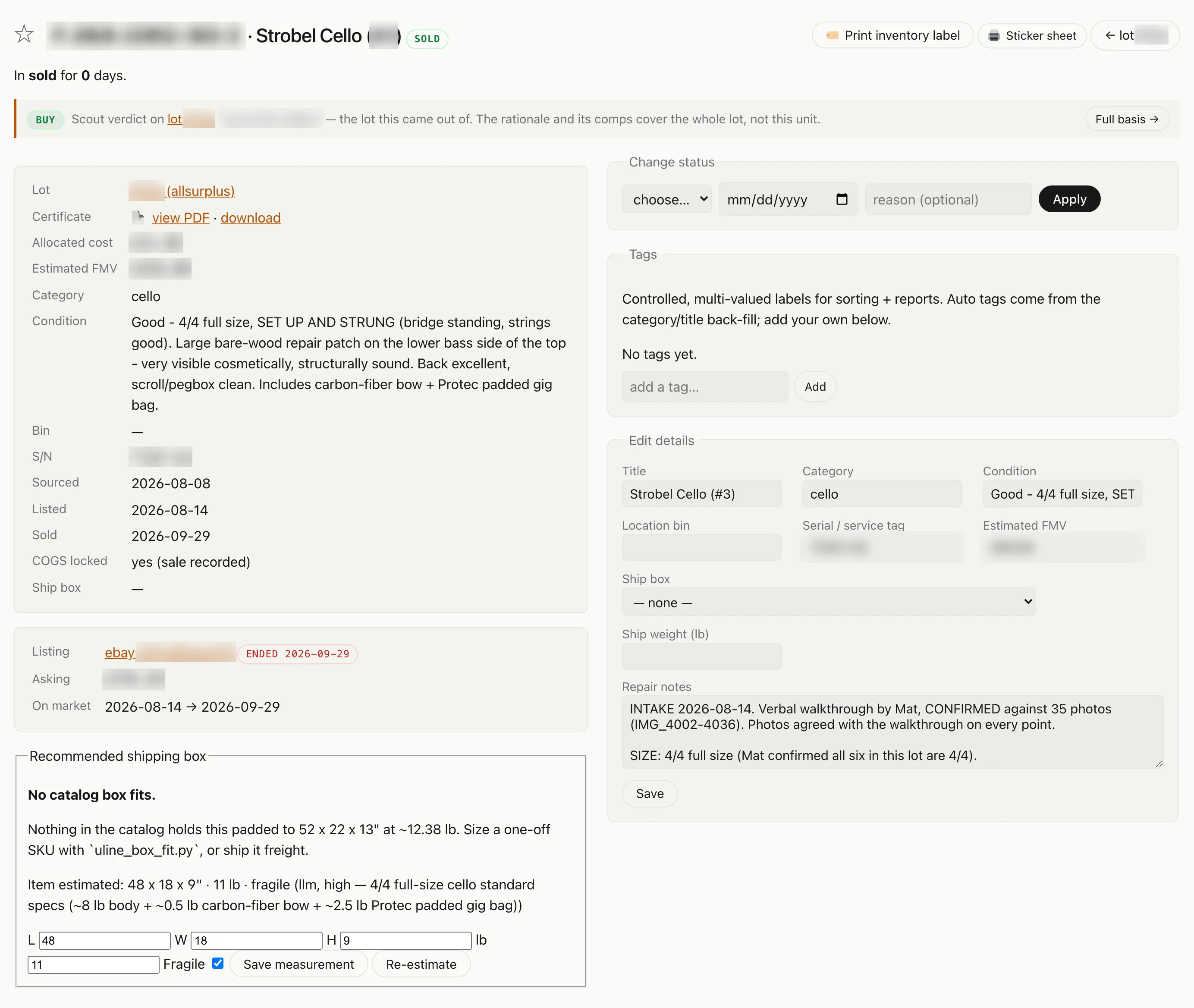
One unit’s record. The lot it came from, what it cost, when it was listed and sold, and the box it should ship in all live on the same page. Identifiers and dollar figures are blurred.
| Stage | What the app does |
|---|---|
| Sourcing | Pulls new lots from several government and corporate surplus auction sites on a schedule, plus targeted keyword sweeps |
| Evaluation | AI identifies the goods from the photos, then the app pulls sold comps, computes a bid ceiling, and posts a verdict |
| Purchase | Won lots import automatically, get SKUs, and get labels |
| Pickup | Groups won lots into one trip per seller, sorted by deadline, with the address, contact, and cost of the drive on one card |
| Repair | Tickets record what was found, what was done, parts used, and labor hours per person |
| Listing | eBay listings are built as drafts through eBay’s own API, with cleaned photos and structured item details |
| Shipping | Recommends the box, prints the pack slip, and tracks each order through a shipping queue |
| Books | Expense ledger, cost of goods locked at the moment of sale, and exports for our accountant |
27 scheduled jobs do the routine work on a clock, like importing wins, syncing orders, and backing up the database. Nobody has to remember to run them.
How AI evaluates an auction
Government surplus listings are often vague. A title like “LAB EQUIP MISC, SEE PHOTO” is common. We wrote about how we filter lots back in June. Here is what the AI part of that does.
It reads every photo. A vision model goes through the whole gallery and reads the nameplates and serial tags. If a label is hard to read, it crops in and tries again. It also reads any PDF the seller attached. When it still cannot name the make and model, a second model on our own hardware takes a look. We benchmarked this: giving the model the full gallery instead of just the lead photo roughly doubled how often it got the make and model right.
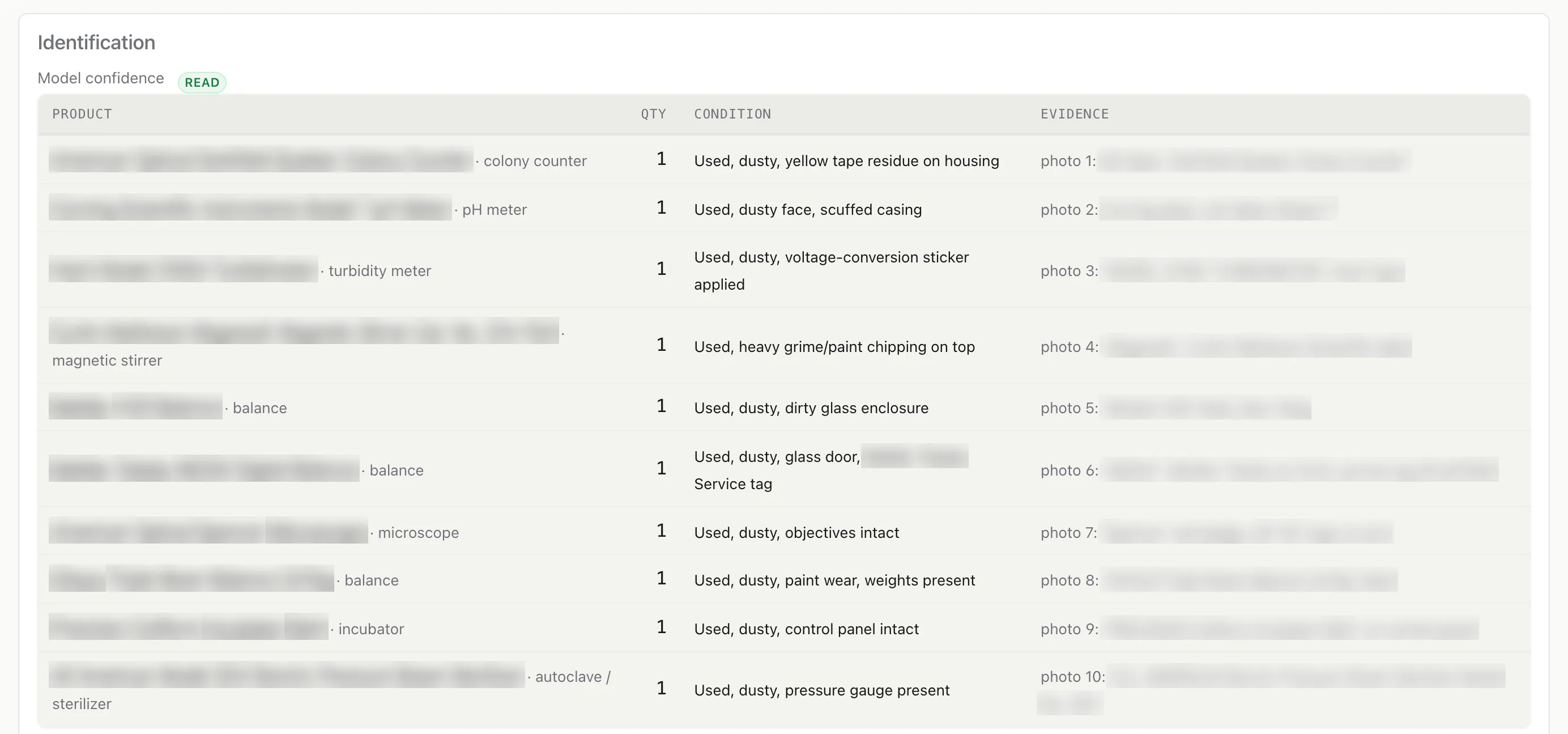
The identification step on a mixed lot of lab equipment. Every product is tied to the photo it was read from and the label text that named it. Product names and label readings are blurred.
It looks up what actually sold. Once the item has a name, the app checks sold prices first. If there are none, it falls back to active listings and discounts them, because an asking price is not a sale price. It adjusts for condition and estimates where the auction will close based on past results.
The bid ceiling is arithmetic. The model identifies the item. It does not set the price. The ceiling starts from the expected sale price, subtracts marketplace fees, shipping, labor, and the auction house’s buyer premium, and then leaves room for a margin.
How we decide what to buy first
Every evaluated lot goes on an Opportunities board with a verdict: buy, watch, skip, no comps found, or out of scope. The board is ranked by headroom, which is the gap between the most we should pay and the current bid. Each verdict opens to a page showing the comps behind it. If the AI got something wrong, we flag it there and it gets re-evaluated.
A digest of the best candidates arrives every morning. A browser extension shows the same verdict on the auction page while we browse.
Bidding stays manual. The app never places a bid on its own, and it refuses any bid over a hard ceiling unless someone overrides it on purpose. That rule is in the code, so it cannot be switched off by accident.
Once a lot arrives, bench time is what runs short. Units are ranked for testing by dollars at risk per bench hour, so an expensive instrument that might be broken gets tested before a cheap one that probably works.
From a won lot to the loading dock
Between the win and the bench there is a drive. Most of what we win has to be collected in person, from a university loading dock, a county garage, or a recycler’s warehouse, and the window to collect it is short. The app assumes 10 business days from the close of the auction and counts down from there.
Putting a trip together used to mean looking in several places. The address was on the buyer’s certificate, the contact was in an email thread, the deadline was on the auction site, and whether the drive was worth making was a judgment call. The pickup board puts all of that on one card per seller.
- Grouped by seller. Won lots arrive on the board through the same scheduled jobs that catch the win. Lots from the same seller become one trip, and trips are sorted by whichever deadline is closest. Each lot carries a countdown that turns amber, then red.
- Everything for the trip on one card. The pickup address, the seller’s contact with a tap-to-call number, the buyer’s certificate, the distance from Philadelphia, and the estimated cost of the drive set against what the lots are worth.
- A verdict on the drive. A short run is marked local. A long one is flagged to combine with other lots in the same direction, or to go by freight instead.
- Scheduling in one step. Pick a date and the card offers a calendar entry already filled in with the address, the contact, directions, and the list of lots to collect. AI drafts the email asking the seller for a pickup time, and a person sends it.
Whether a lot fits in the car is settled before we bid, not at the dock. The Opportunities board can filter to lots our car can carry, so a load that needs a truck never turns into a surprise on pickup day.
The car is a Tesla Model Y running Tesla’s Full Self-Driving (Supervised). The navigation button on each trip card sends the address to the car from a phone, and on the highway the car does the driving while one of us supervises. On a long run, whoever is behind the wheel gets to the dock with more left for the loading.
Research before the repair
For used equipment, the slow part was never the repair. It was the reading beforehand: which revision is this, where is the service manual, what is missing, and is it worth bench time at all.
AI does most of that reading now. When a lot comes in, Claude identifies each unit from its nameplate and finds the manufacturer’s manual. It writes a test plan and prices any missing parts from live listings. Then it recommends how much effort the unit deserves. For vintage audio, it starts from the symptom and works toward the likely failed part.
A person still does the repair and signs off on the result.
Listing on eBay
A good listing needs a title, a category, a dozen item specifics, photos, a description, and a weight and box size. The app drafts most of it.
- Clean data. Listings go in through eBay’s own selling API, so the category and item specifics are filled in directly instead of through a web form.
- Photos cleaned, not altered. Backgrounds are replaced with white. The item itself is left alone, because a flattering photo leads to a return.
- Descriptions from the bench record. The description comes from the unit’s record and its bench report, so it says what was actually tested.
- Every listing stops as a draft. A person reviews it and presses publish.
When a listing sits too long, the app suggests a price change on a fixed schedule. Someone approves each one.
Shipping and the books
When an order comes in, AI estimates the package size and the app picks the cheapest box that fits, counting the box and the postage together. The pack slip prints at the office on its own. The app checks the printer’s page counter and only marks the slip printed if the counter moved. The AI assistant buys the shipping label through eBay’s seller tools, and the order moves from awaiting, to label created, to shipped.
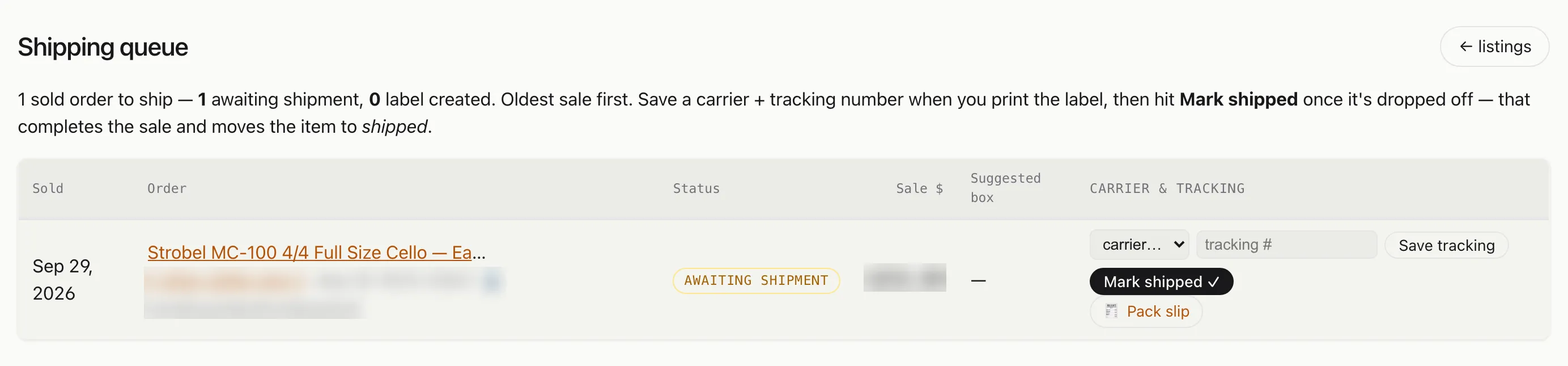
The shipping queue. An order goes from awaiting shipment to label created to shipped from this one row. Order numbers, the buyer and the sale price are blurred.
Every cost goes into one expense ledger. Cost of goods is locked when the item sells, so a margin checked next year matches the margin on the day it sold. Our accountant has a login that can see everything and change almost nothing. At tax time, the exports include a reconciliation against the payment processor’s 1099-K.
Asking the app questions
The app exposes 74 tools to Claude. In practice, we can ask “what has been sitting untested the longest” or “what did we net on that pallet” in a chat window and get an answer from live data.
Claude also makes changes to the app. We describe what we want in plain English, like a new report or a new field on the repair ticket, and the change is written, tested, and deployed.
What stops a bad change
A business owner cares about two things here. A change should not break the app on a busy morning, and if something does go wrong, it should be easy to go back. This is how we make sure of both:
- Every change is tested before it goes live. The app has 4,466 automated test functions. They run on every change, along with browser tests that click through the app like a person would. A change that fails does not ship, and a change that deletes tests to pass is blocked.
- Any release can be undone. Every release is pinned to an exact build, so going back means redeploying the last one that worked.
- The data is backed up every night. There are daily snapshots on the storage itself, a nightly backup to separate storage, and a weekly copy with a different cloud provider. An alert fires if a backup goes stale. Restoring follows a written, step-by-step procedure.
- Some actions always need a person. Placing a bid, publishing a listing, and deleting data cannot be done by the AI alone.
How we would approach an HVAC company
We have not built this for an HVAC shop yet. Here is how we would start one.
First, a walk-through. Before building anything, we would map how a job moves through your shop today, from the first phone call to the paid invoice. We would note where it stalls and what the office retypes. Most owners know the pain points without having a list of requirements. The walk-through produces that list, and the build is done to it.
Then the same pieces from our app would carry over:
- A job record instead of an item record. Lead, estimate, scheduled, in progress, complete, invoiced, paid. The app would enforce the order, so a job cannot be invoiced before it is finished.
- Reading the nameplate before the truck rolls. A customer texts a photo of their furnace. The same vision work that reads a lab instrument’s nameplate would read the model and serial number, work out the unit’s age, find the service manual, and list the likely parts before a technician goes out.
- Answers on site. A technician in a basement could ask a question and get an answer based on that unit’s manual and that customer’s history.
- Dispatch like our pickup board. Ours groups stops by seller, sorts them by deadline, and sends the address to the car. A contractor’s version would group the day’s calls by area, put the ones promised soonest first, and send each technician the next address.
- Hours that become payroll. Hours logged per technician per job are the same kind of data as our repair labor. They would cost the job and roll up for your payroll provider or accountant.
- One customer record. We already sync email into a customer record and have AI draft replies. For a trade, that record would also hold calls, texts, estimates, invoices, and reviews.
- Feedback that gets read. AI would sort reviews and complaints by what went wrong and which technician was on the job.
- Phone calls. Our own business runs on email, so we have not built voice. A trade business runs on the phone. Appointment reminders, call transcripts on the customer record, and after-hours calls answered and logged would be early priorities.
All of it would be one app, on one database, with one login per person. After the build, you pay for hosting and an AI account, not a monthly fee per seat for each tool.
Why this works now
Most small businesses pay for several tools that each almost fit. Custom software used to mean paying a developer for every change and hoping nothing broke.
Now a change can be asked for in plain English, by you or by us, and it goes through the same tests and the same undo path described above. We start with the walk-through, build the app to fit how your shop runs, and set up the testing and backups underneath it. We run our own business on that same setup every day.